
Server address and ports
The Network page shows the selected server’s assigned public address and ports. These values are read-only.
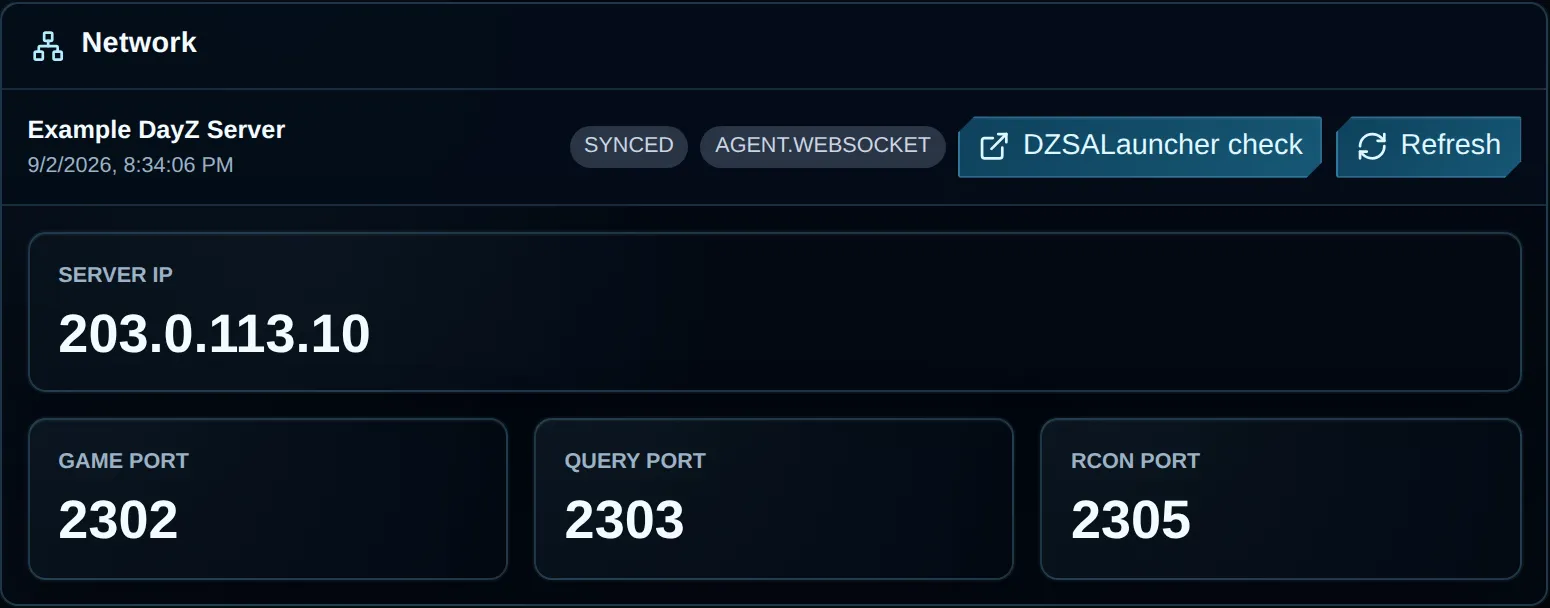
The documentation example uses 203.0.113.10. Use the address and ports from your own panel, and do not share RCON credentials.
Network fields
Section titled “Network fields”| Field | Meaning | Used by |
|---|---|---|
| Server IP | The server address used by customers and tools. | Game clients, launchers and remote tools. |
| Game Port | The main port carrying DayZ gameplay traffic. | Direct connections and game traffic. |
| Query Port | The port used for Steam/A2S discovery. | Server-browser and launcher lookups. |
| RCON Port | The endpoint for remote console access. | RCON clients and server-management integrations. |
Use each port for its assigned service. Gameplay can work even when queries or RCON are unavailable.
Test a new player connection even if the panel shows Online or the server returns an A2S_INFO reply. Supported VxShield queries can receive cached status, so a browser response alone won’t tell you whether someone can join.
Select Refresh to fetch current values from the host. Unknown means it returned no usable address or port. Do not substitute values from another server.
If Dashboard, Config and the latest startup log show different query ports, confirm they refer to the same server and run. Compare the active steamQueryPort with the process’s UDP listeners using the discovery checks. Use the listeners to check which endpoint is running, and ask support to confirm a managed service’s assignment before changing ports or firewall rules.
Check the server in DZSALauncher
Section titled “Check the server in DZSALauncher”For a server you intend to list publicly, select DZSALauncher check once the address and query port are available. Use these values on the launcher’s public check page:
Server IP + Query PortThe form asks for Server IP:Steam Query Port, with a colon between the values. Check the address and query port before submitting, even if the panel filled them in.
Submitting sends that public endpoint to DZSALauncher, whose page describes adding servers to the launcher. The check does not start DayZ or change its configuration. Test player joins and RCON separately, even if the launcher finds the server.
Which address should you share?
Section titled “Which address should you share?”- For direct connections, give players the Server IP and Game Port.
- Run launcher and server-browser checks with the Server IP and Query Port.
- Keep the RCON Port and RCON password out of player-facing channels. They are private administration details.
Contact support if an assigned port is unreachable on managed DayZ, where VYKIX staff handle VxShield protection. For DayZ on a VPS or dedicated server whose firewall you manage, follow the DayZ VxShield setup guide to align configured ports and protection rules.
Troubleshooting
Section titled “Troubleshooting”| Symptom | Check |
|---|---|
| Direct connection fails | Check the running state and startup logs, then test a new connection with Server IP and Game Port, even if the panel shows Online. |
| Launcher cannot find the server | Refresh the values, check Query Port, run DZSALauncher check and read the RPT startup output. |
| RCON client cannot connect | Check RCON Port, client/protocol settings and password. Confirm that RCON is configured and the server is online. |
Values show Unknown |
Try one refresh, then send support the external server ID from Details. |
| Address changed | Update saved launcher entries and integrations. Ask support to confirm the assignment before changing firewalls. |
For listener, query-port and browser troubleshooting, follow DayZ server not showing up. Redact passwords and tokens from support excerpts.