
DayZ Standalone DDoS Protection
For DayZ DDoS protection, give each public DayZ Standalone port a VxShield rule with the right protocol and filter. Create separate rules for game connections, Steam server-browser queries and RCON administration.
Follow these steps if you manage the firewall on a VYKIX VPS or dedicated server. VYKIX staff handle VxShield for managed DayZ server hosting. For that service, find your assigned addresses in VXPanel’s Network page and ask support about connection problems.
DayZ Ports and Filters
Section titled “DayZ Ports and Filters”Read your DayZ server configuration to find the ports before you add rules. The DayZ preset starts with example values: 2302 for the game, 2303 for queries and 2305 for RCON. Replace those examples with your working ports.
| Purpose | Example port | Protocol | Filter |
|---|---|---|---|
| Game traffic | 2302 | UDP | DayZ |
| Steam query | 2303 or 27016 | UDP | A2S Query Cache |
| RCON | 2305 | UDP | Generic UDP Rate Limiter |
Match the Steam query rule to your configured value: 2303, 27016 or a custom port. Choose the one your server uses; the table does not ask you to open both examples. Use the configured game and RCON values for their rules as well.
Find your DayZ game and Steam query ports
Section titled “Find your DayZ game and Steam query ports”Find the game port in the -port startup parameter and the Steam query port in steamQueryPort inside serverDZ.cfg. Each needs a matching rule in VxShield and the operating-system firewall. VXPanel documents the Steam query setting under Network and security configuration fields; keep the port assigned to your service.
Apply DayZ to the game port and A2S Query Cache to the Steam query port that players and listing tools check. RCON uses the listed Generic UDP Rate Limiter filter. Test queries and RCON even when game connections work.
Recommended Setup
Section titled “Recommended Setup”To keep RCON private, leave its port closed. Choose Single and add the game and query rules you need, then omit the RCON connection test below.
- Start with a running DayZ server. Record its game and Steam query ports, plus the RCON port if you need public RCON access.
- Sign in to the VxShield dashboard with your VYKIX customer account. Choose the protected IP assigned to the VPS or dedicated server you are configuring.
- Click Add rule, then choose DayZ to load the game, query and RCON preset. Choose Single to add selected services or leave RCON closed.
- In the DayZ preset, enter the values for Game port, Query port and RCON port before choosing Apply DayZ preset. For a Single rule, fill in the service port, protocol and filter and click Apply rule. Add a rule for each service you need.
- Compare the saved rules with the running server’s ports and the filter table above. Give each required service matching permission in the operating-system firewall.
- From outside the server, join using the game address and check its server-browser listing through the query port. If you enabled RCON, test that with your RCON tool too.
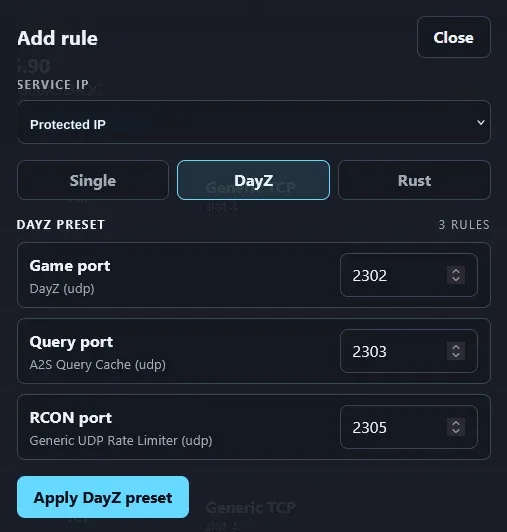 Replace the preset’s example ports with the ports from your server configuration.
For sign-in, IP selection and individual rules, follow the VxShield Firewall Guide. You can also find this port/filter reference in its DayZ Standalone Protection section.
Troubleshoot DayZ connections
Section titled “Troubleshoot DayZ connections”After saving the rules, test each connection type at the address and port configured for that service.
Players cannot connect to the game
Section titled “Players cannot connect to the game”Check the server’s running state and selected protected IP. Its game-port rule needs UDP and the DayZ filter, with permission for that port in the operating-system firewall.
Direct connection works, but the server-browser check fails
Section titled “Direct connection works, but the server-browser check fails”When players can join by IP but cannot find the DayZ server in the browser, compare steamQueryPort in serverDZ.cfg against both the UDP A2S Query Cache rule and the operating-system firewall. Keep the query and game ports separate. This tests the query connection; a missing listing can have other causes.
Players can join, but RCON cannot connect
Section titled “Players can join, but RCON cannot connect”Match the RCON port to its UDP Generic UDP Rate Limiter rule. Check that the RCON service listens on that port and that the operating-system firewall allows it. If the error concerns authentication, compare the client’s password with the RCON password configured on the server.
For RCON that has no configuration or fails to load at startup, check its configuration file and logs using CFTools’ BattlEye RCON troubleshooting steps. Resolve those checks before editing firewall rules.
Localhost works, but outside connections fail
Section titled “Localhost works, but outside connections fail”A localhost test bypasses the public traffic path. Check the selected IP, port and protocol in VxShield, then check the operating-system firewall.
If access still fails after these checks, send VYKIX support the server IP, connection type, port, protocol, filter and exact error. Report the results from both the server itself and an outside connection. Connection failure by itself is not evidence of a DDoS attack.
Related
Section titled “Related”- DayZ DDoS protection guide: explains attack types, filtering methods and their limits.
- StalkerZ DayZ attack case study: documents the customer incident and supporting evidence.
- DDoS protected DayZ server hosting: covers managed hosting with protection rules handled by VYKIX staff.