How to Set Up a DayZ Server: Beginner Guide for 2026
Step-by-step guide to setting up a DayZ server in 2026. Covers serverDZ.cfg settings, UDP port forwarding, mod installation, DDoS protection, and VYKIX setup.
On this page
Before you invite players, make one successful join and find the server in the browser. That checks the files, serverDZ.cfg, assigned network ports and any loaded mods together. A running process alone does not finish the setup.
Choose who will maintain it. On a VPS or dedicated machine, you install and manage the OS and game. Managed hosting provides panel controls for game configuration while the host maintains the underlying system.
Before the first invitation:
- Choose managed hosting or a self-managed machine based on the administration you want to own.
- Install the game, edit the selected config and confirm the assigned ports before adding mods.
- Check direct joining and browser discovery as separate steps.
- Test the map and player activity. DayZ has a job system and multithreaded replication; use the requirements guide instead of sizing from GHz alone.
What You Need Before Starting
Your preparation depends on the hosting route. A self-managed installation needs the server files and an update method; a managed service supplies its supported workflow.
Check what you will use for each job:
- A host. Choose a managed game service, VPS, dedicated machine or home PC. For home hosting, check public access and upstream protection before opening a community.
- Steam credentials for a manual download. Use the account login required by the server installation instructions.
- SteamCMD for self-managed updates. Valve’s command-line tool downloads dedicated-server applications. Match its setup to your OS and server build.
- File access. VXPanel provides browser File Manager and SFTP for game files. A self-managed host needs local access or another supported transfer method.
- A text editor. Notepad++ or VS Code can edit
serverDZ.cfgand other settings.
On our managed service, use VXPanel for configuration and mods. File Manager suits small edits; SFTP handles larger transfers. The file-access guide explains the controls and file-policy boundaries.
Game Panel vs Manual Setup
A managed panel gives you browser controls for the game’s files and maintenance workflow. A self-managed VPS or dedicated machine gives you OS access, with responsibility for installation, updates and security.
Compare the tasks you want to handle before comparing the bill.
| Feature | Game Panel (Managed Host) | Manual Setup (VPS/Dedicated) |
|---|---|---|
| Setup | Configure through the provider’s panel | Install and maintain the OS and game |
| Mods | Use Workshop and file controls, then check dependencies and joining | Copy packages and keys and configure launch arguments |
| Updates | Follow the workflow enabled for the service | Maintain update commands or automation |
| Files | Game-file access through supported panel or SFTP controls | Access permitted by your OS account |
| Performance | Test the allocated hardware with your workload | Test the selected hardware with your workload |
| Cost | Plan total, inclusions and selected extras | Rental, extras and your administration |
| DDoS | Confirm included protection | Confirm upstream filtering and configure your firewalls |
Choose managed hosting if you want to configure DayZ while the host maintains its hardware and OS.
Choose manual setup when you need OS control or custom networking and can maintain it. Confirm plan permissions and capacity before using one machine for several servers.
Basic Server Configuration: serverDZ.cfg
Check -config to find the file DayZ reads. serverDZ.cfg is a common filename, not a guarantee that a similarly named copy is active.
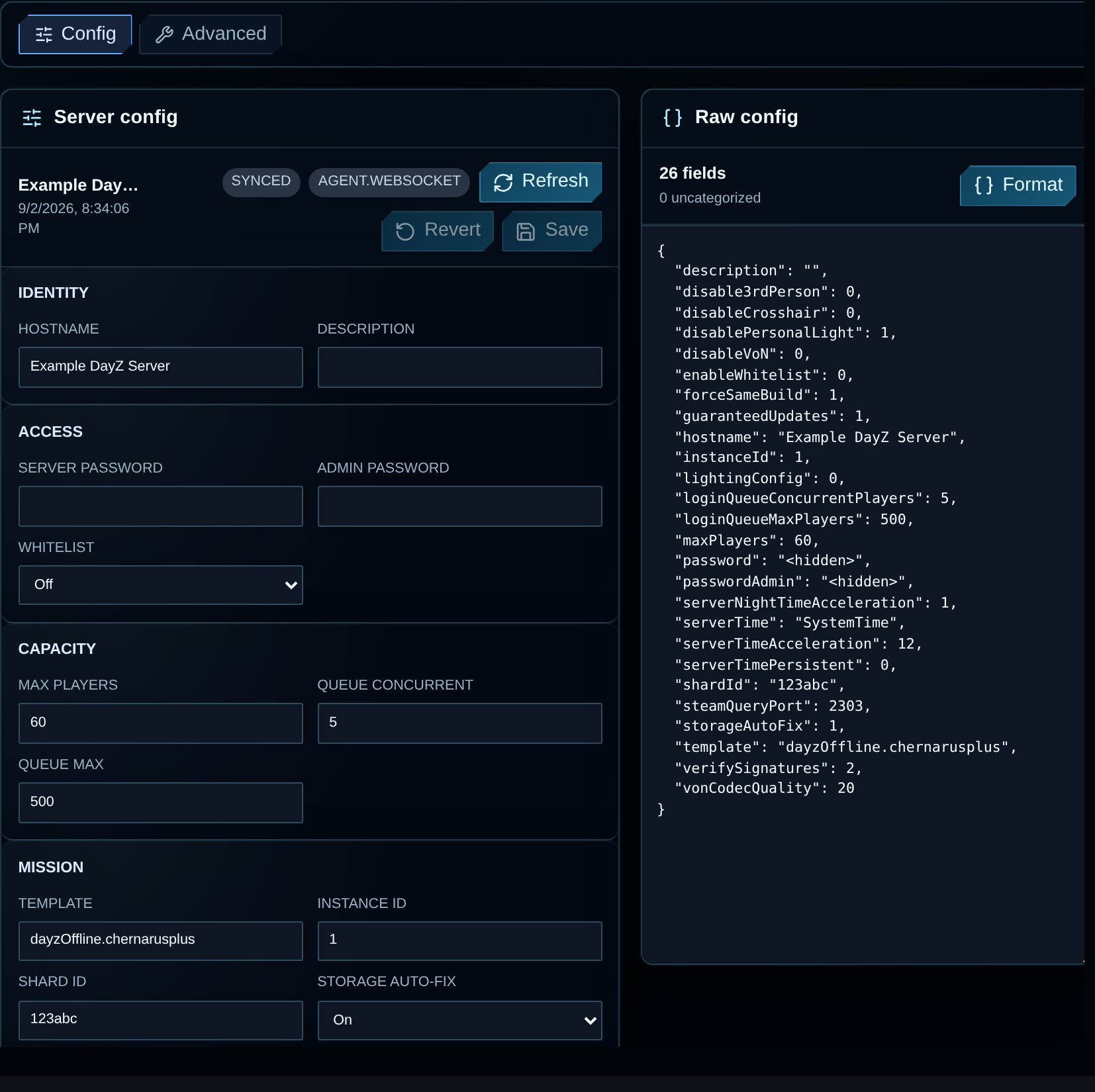
Our Config page has grouped controls. Use Refresh, wait for Synced, make the change and save. Keep the assigned mission, ports and persistence values unless a backed-up change requires them to move.
This excerpt covers identity and camera settings. Preserve the other fields in your working file and replace both password placeholders before using it:
// Server identityhostname = "My DayZ Server";              // Name shown in server browserpassword = "REPLACE_WITH_JOIN_PASSWORD";  // Share with the players you invitepasswordAdmin = "REPLACE_WITH_ADMIN_PASSWORD"; // Keep separate from player access
// GameplayverifySignatures = 2;                     // Verify mod signaturesdisable3rdPerson = 0;                    // 0 = allow, 1 = first-person onlydisableCrosshair = 0;                    // 0 = show crosshair, 1 = hide
Protect the existing setup while editing:
- Keep
verifySignatures = 2. Repair missing or mismatched mod files and keys instead of turning checks off. - Preserve
instanceIdand mission/storage paths. A different assignment can load a different world without deleting the old one. - Back up, make a small change, restart and test. The Config reference covers time, gameplay and mission fields.
Use Bohemia’s DayZ server configuration reference for the keys and launch arguments.
Port Forwarding and Firewall
Confirm the game, query and optional RCON endpoints before making firewall or router rules. Each serves a different purpose.
VXPanel’s Network page lists the address and ports for your instance:
| Endpoint | Where to verify it | Purpose |
|---|---|---|
| Game port | VXPanel Network or the self-managed -port launch argument |
Direct joining and gameplay traffic |
| Query port | VXPanel Network or the self-managed steamQueryPort setting |
Steam/A2S server-browser discovery |
| RCON port | VXPanel Network or the self-managed BattlEye configuration | Remote administration when enabled |
Managed hosting: Keep the assigned ports, give players the game address and contact support before changing network settings.
VPS or dedicated: Match the OS firewall and upstream filtering to the configured game and query endpoints. Restrict administration to the people and tools that need it. Opening the OS firewall does not open a closed upstream filter.
Home PC: Check router and ISP restrictions before forwarding to the server’s local address. Carrier-grade NAT can prevent normal forwarding from making the service reachable.
If a direct join works but discovery fails, check the query assignment, filtering and RPT startup output. Preserve the separate results for support.
Essential First Settings New Admins Get Wrong
Review access and persistence before a live change. A mistaken assignment can send players to an empty-looking world or lock them out of a server that still runs.
Server name. Put a recognisable community name and useful map/playstyle details in hostname within serverDZ.cfg. For example: StalkerZ | Hardcore RP | Custom Map | No KOS. Test that players can find the name in their browser filters.
Player and admin access. Use password for a join password and prepare whitelisting as a separate control. passwordAdmin authenticates an in-game admin; BattlEye uses RConPassword for RCON. Keep the credentials separate. Our access reference maps the controls. After a password change, test a new join rather than relying on someone already connected.
For friends or approved community members, private DayZ hosting explains admission choices.
Slots. Set maxPlayers from a test of the map, mods and activity. The workload checklist records server FPS, memory and CPU; a connection cap does not prove playable capacity.
Persistence. Stop the instance and verify a copy of the saved data before changing mission, instance or storage assignments. Follow the mission guidance; a generic config excerpt is not a wipe or retention procedure.
Time acceleration. serverTimeAcceleration sets the time multiplier. serverNightTimeAcceleration multiplies it again at night. Check a complete day/night cycle before publishing the schedule.
Camera and crosshair. disable3rdPerson = 1 removes the third-person camera, and disableCrosshair = 1 hides the crosshair. Choose the rules, restart and verify them from a player client.
Adding Mods to Your DayZ Server
On a self-managed server, -mod= loads a semicolon-separated list of mod paths. Use -serverMod= only for author-supported server-only content. Follow the required scope, dependencies and loading order.
For Workshop downloads, manual SFTP, .bikey files and error diagnosis, use the separate installation walkthrough:
How to Add Mods to Your DayZ Server
For a manual install, copy the required package and keys, set its paths and scope, and test joining with matching client content.
In VXPanel’s Mods page, find the Workshop item, review requirements, install it and set the load order. Restart and join to test it. Update checks report status without installing files; confirm your service’s update workflow. Let the panel own the mod list instead of adding another in launch parameters.
For cooperative rules, the DayZ PvE guide covers damage controls and their tests.
DDoS Protection for Your DayZ Server
Ask which DDoS controls cover your game and query services. VxShield comes with our managed DayZ hosting and filters traffic upstream of the game server.
Our DayZ profile can answer supported A2S_INFO queries from cache. That is server-browser handling, not a gameplay-latency result or a promise of uninterrupted play. Investigate mod errors, overloaded scripts and ordinary connectivity failures on their own evidence.
VYKIX’s documented cases and configuration references include:
- StalkerZ’s changing attack rounds
- KarmaKrew’s A2S incident
- DayZ DDoS technical documentation for protocol-aware filtering
On a VPS or dedicated machine, compare the provider’s protection with the firewall rules you manage. The hosting type does not define which filters are included.
Setting Up a DayZ Server on VYKIX
We maintain the hardware and host OS. You use VXPanel to edit the game, transfer files and manage the mod configuration.
After the service is ready:
- Confirm the order. Managed DayZ has no added player-slot fee, with slots, memory and storage subject to fair use. The paid sheet names an overclocked i9-14900K. Review the order total, including applicable taxes and fees, before payment.
- Record the assignment. Find the game and query address in Network and keep the assigned ports.
- Set the game controls. Review the mission, name, admission and gameplay fields in Config. Back up an existing setup first.
- Install the chosen mods. Review dependencies, scope and author-required order.
- Verify access. Read startup logs, join with the required client files and find the listing in the browser before inviting players.
Paid managed DayZ runs in Chicago and Amsterdam, with VxShield included. Our free 48-hour trial requires a valid card for fraud verification, has no trial charge and cannot convert to a paid plan. Hardware can differ. At expiry the service is suspended; active data is deleted seven calendar days later. Export required files before expiry. Trial terms
For an existing server, ask about best-effort migration before cancelling its host. We confirm eligibility, technical scope, timing and terms before work begins. Contact VYKIX on Discord or use live chat.
Common Questions
How do I set up a DayZ server?
Choose managed hosting or a self-managed machine, configure the name, admission and mission, then verify game and query ports. Add mods and test joining. VYKIX supplies VXPanel controls for game settings and files while we maintain the host OS.
What ports does a DayZ server need?
Use the assigned game and query endpoints. Open the configured RCON port only if you need restricted remote administration. Assignments can differ between instances; VXPanel’s Network page shows yours. Self-managed owners should check launch arguments, DayZ settings and BattlEye before creating rules.
How much does it cost to host a DayZ server?
Our managed DayZ plan has no added player-slot fee and includes VxShield, with slots, memory and storage subject to fair use. Select Chicago or Amsterdam and a billing term, then review the total, including applicable taxes and fees, before payment.
Do I need SteamCMD to run a DayZ server?
SteamCMD is one download and update method for a self-managed server. Bohemia’s Linux guide uses a Steam account login and stable-server app ID 223350. On managed VYKIX hosting, use the supported panel workflows and confirm update settings with support.
What is serverDZ.cfg?
serverDZ.cfg is a common filename for the configuration selected by -config. It contains the name, passwords, player limit, mission and time settings. VXPanel provides grouped fields for managed services.
Can I run a DayZ server on my home PC?
Yes, if the PC and connection fit the workload and allow inbound access. Check router and ISP restrictions, including carrier-grade NAT. Keep the machine and connection available while friends play, and test the intended map, mods and player activity.
See DayZ hosting plans. Eligible switchers can ask us to confirm the migration offer’s scope and terms before ordering.
Ask VYKIX on Discord with your map, mod list and the step you are working on. For a failed start or join, include the exact error and relevant log lines with credentials removed.
Game-aware DDoS protection for your server.
Run your game server with VxShield included. Ask about free migration and seven days free for eligible customers switching hosts. VYKIX confirms the scope, timing, and terms before the move.
Continue with