How to Add Mods to a DayZ Server: Full Guide
Step-by-step guide to installing mods on your DayZ server: Steam Workshop, manual SFTP, .bikey files, -mod= load order, and RPT log troubleshooting.
On this page
A mod is ready when the server loads it, the required clients can join and its feature works. Start with the author’s files, dependencies and loading scope. Signed client content also needs the accepted public signing key; server-only packages can have different requirements.
Download through Workshop or transfer an authorised release, then check the RPT log and test in game. For managed VYKIX servers, use Workshop installation in VXPanel. Our modded DayZ hosting page explains file access, updates and workload checks.
Keep these checks together:
- Workshop and manual transfer are installation routes; SFTP is one option for transferring private or non-Workshop packages.
- Signed client mods need their folder, required
.bikeyinkeys/, dependencies and correct launch settings. - A signature failure needs a version, file-integrity and accepted-key check.
- Test the feature after startup. An installed folder does not prove the mod is working.
What You Need Before Installing Mods
Prepare a working server and a recoverable copy before adding packages.
A running DayZ PC server. Test a vanilla player join first. Managed hosting, a VPS or a dedicated server can run the game. The DayZ cost guide compares their costs and administration.
Workshop access. Use Steam, SteamCMD or the host’s supported installer. You can download through Steam on your own PC and transfer the files; the Steam client need not run on the server.
A transfer method. WinSCP and FileZilla support SFTP uploads. Local access or another supported method can also work; the mod does not require SFTP itself.
A text editor. Use an editor such as Notepad++ or VS Code for startup arguments and configuration files.
Installing DayZ Mods via Steam Workshop
For a Workshop install, identify the package, download it and place the files where the launch settings expect them. Follow the author’s key and dependency requirements.

Step 1: Find the Mod’s Workshop ID
The Workshop URL contains the item’s unique ID. Community Framework (CF), for example, uses:
https://steamcommunity.com/sharedfiles/filedetails/?id=1559212036Record 1559212036 for the SteamCMD download.
Step 2: Download with SteamCMD
On a self-managed installation without a host-provided installer, use SteamCMD to request the mod:
force_install_dir C:\DayZServerlogin YOUR_STEAM_LOGINworkshop_download_item 221100 1559212036quitReplace YOUR_STEAM_LOGIN with your account name. Enter passwords and Steam Guard codes at the prompt, never in a shared script. Bohemia’s Linux guide uses an authenticated Workshop download. 221100 is DayZ’s app ID; 1559212036 is CF. Read SteamCMD’s result and locate steamapps/workshop/content/221100/1559212036/ before copying.
Step 3: Move the @ModName Folder
Place the downloaded package in the server root and use the folder name expected by your launch settings, such as @CF or @DayZ-Expansion-Core. On Windows, that root contains DayZServer_x64.exe.
For CF, the resulting layout may look like this:
DayZServer/├── DayZServer_x64.exe├── @CF/│ ├── Addons/│ │ ├── CF.pbo│ │ └── CF.pbo.CF.bisign│ └── Keys/│ └── CF.bikey├── keys/└── serverDZ.cfgStep 4: Copy the .bikey File
For signed client-required content, put the author’s required public .bikey files in the central keys/ directory. Follow the package instructions: a server-only package may have no client-signature key.
The .bikey is the public verification key. A .bisign file sits beside the PBO it signs. Accepted keys let the server verify client content; missing keys, mismatched versions or damaged files can cause rejection. Bohemia mod structure
Copy: @CF/Keys/CF.bikey → keys/CF.bikeyCheck the keys for each signed client package you accept, without disabling signature verification.
Step 5: Update the -mod= Startup Parameter
Use -mod= for the normal mod list. Match the installed paths and separate them with semicolons:
"-mod=@CF;@VPPAdminTools"On a self-managed machine, edit the batch file or service configuration that starts DayZServer_x64.exe. In VXPanel, let Mods manage scope and load order. A second list in Advanced launch parameters can conflict with the panel-owned list.
Step 6: Restart and Verify
Restart in a maintenance window, read RPT and script logs from the configured profile directory, then join and exercise the mod’s feature. Investigate the exact error rather than assuming a single cause.
Manual Mod Installation via SFTP
Use a publisher-authorised, server-ready package for non-Workshop content. Follow its folder and configuration instructions. A GitHub source archive may need packaging before DayZ can load it. Transfer the release through SFTP, local access or another supported method.
Folder Structure
A signed package can have this layout:
@ModName/├── Addons/│ ├── modfile.pbo│ └── modfile.pbo.modname.bisign└── Keys/ └── modname.bikeyTransfer the complete @ModName/ folder to the server root. For the signed client package shown, copy its .bikey from @ModName/Keys/ into the central keys/ directory. Server-only packages follow their own publisher requirements.
When to Use Manual Installation
- Non-Workshop releases. Use a packaged GitHub release or the author’s other distribution method.
- Private community mods. Transfer the authorised build and its required configuration.
- Coordinated rollback. Retain a permitted known-good package only when the game version and required client files can match it. Old server files can reject updated Workshop clients. Check the author’s terms and test on an isolated copy.
Before removing an accepted key, check whether another active mod uses it.
On a self-managed server, use the author’s startup parameter and restart after setup.
In VXPanel, upload first, then create an Advanced local binding on the Mods page. It points to an existing folder; it does not upload or validate files. Set the required scope and load order before restarting.
Understanding -mod= vs -serverMod=
-mod= loads the normal client-visible list. Choose -serverMod= only when the author supports running the package without client files. An admin tool may still need a client installation.
| Parameter | Who needs it | Player download required | Example mods |
|---|---|---|---|
-mod= |
Server + Client | Follow publisher requirements | @CF, @VPPAdminTools, @DayZ-Expansion-Core, @Trader, @Code_Lock |
-serverMod= |
Server only | No, when the publisher supports this scope | Publisher-documented server-only packages |
The VPPAdminTools installation guide puts CF first and VPPAdminTools next in -mod=.
Use the documented argument for that pair:
"-mod=@CF;@VPPAdminTools"Follow the dependency and loading instructions, then check the feature after each change. Missing dependencies and wrong order can cause failures, but configuration, permissions and versions can produce similar symptoms.
Best DayZ Mods for 2026
Choose packages for your community’s rules. The examples below cover gameplay, building and administration; install the categories you need rather than collecting a large list before the first test.
Essential Foundation
| Mod | What it does | Dependency |
|---|---|---|
| Community Framework (CF) | Shared framework used by mods that list it as a requirement. | Follow the publisher’s required-item list |
Install CF when a chosen mod requires it. Expansion’s installation guide also lists Dabs Framework and explains the bundle and module choices.
For an Expansion-based server, DayZ Expansion hosting covers module selection, mission-file access and pre-launch checks.
Gameplay Mods
| Mod | What it does | Dependency |
|---|---|---|
| DayZ Expansion (Core + Modules) | Modules for vehicles, AI patrols, base building and other community features. | CF, Dabs Framework and the selected modules’ requirements |
| Trader | Trading and economy features. | Check the current publisher’s required-item list |
| Code Lock | Keypad locks for supported doors and gates. | Check the current publisher’s required-item list |
| TraderPlus | Trading, banking and related economy features. | Check the current publisher’s requirements and compatibility with other trader systems |
Building and Base Mods
| Mod | What it does | Dependency |
|---|---|---|
| BuilderItems | Building and map-decoration assets. | Check the current publisher’s required-item list |
| MuchStuffPack | Furniture, storage containers and decorative items. | Check the current publisher’s required-item list |
| Base Building Plus | Additional construction options. | Check the current publisher’s required-item list |
Admin and Server Management
| Mod | What it does | Dependency |
|---|---|---|
| VPPAdminTools | Logging, teleport, player management and a map interface. Load it in -mod= after CF. |
CF |
| COT (Community Online Tools) | Administration tools including object spawning and player controls. | CF |
Map Mods
Namalsk Survival adds Namalsk-specific mechanics. Read the author’s terrain, dependency and licence instructions; the map name is not a complete installation list.
Start with the smallest set that delivers your rules. Install a package and its dependencies, test joining and its main feature, then add the next. Neither PvE nor roleplay needs one universal mod list.
Troubleshooting Mod Conflicts
Keep the RPT and script logs, package versions and last change after a failed start or crash. A mod error is one possibility to investigate.
Where to Find RPT Logs
Follow the profile path in the launch arguments. With -profiles=C:\DayZ\Logs, look there. Otherwise confirm the server profile directory; Bohemia places logs under that profile by default. The working directory and service account can affect which files you find.
Match the dated RPT file to the failed start or crash, then keep the surrounding lines rather than copying only the final error.
Common Errors and Fixes
“Signature verification failed”
Identify the rejected file and compare client/server versions, integrity and accepted keys. Get matching PBO, .bisign and .bikey files from the author. Check shared-key use before replacing a key, and leave signature verification enabled.
“Mod not signed”
Verify that signature files are present and the server accepts the author’s public key. Adding a .bikey cannot sign an unsigned PBO. Obtain a signed release when client verification requires one.
“Access Violation” crash
An access violation tells you the process crashed; it does not name the cause. Preserve the crash and script logs, build, mod versions and preceding action.
Use an isolated, backed-up copy for removal tests. Removing content mods from a live world can affect saved objects. Change one suspected package or setting with dependencies intact, then repeat the activity. A short run without a crash is a clue to investigate.
Server starts but a mod feature does not work
Check configuration, permissions, loading scope, dependencies and version compatibility. Follow the author’s setup and test the feature. This symptom alone does not identify a load-order fault.
General Troubleshooting Steps
- Keep RPT and script-log lines around the failing action.
- Match package versions and keys; remove a key only after checking other active packages.
- Put dependencies before their dependents in the author’s required order.
- Read compatibility guidance for the installed versions.
- Reduce the mod set on an isolated copy while preserving dependencies and the original persistence.
Workshop Mod Installation in VXPanel
Our managed DayZ service uses the Workshop catalog on VXPanel’s Mods page. Search by title or ID and open the Workshop item to confirm the package before installing.
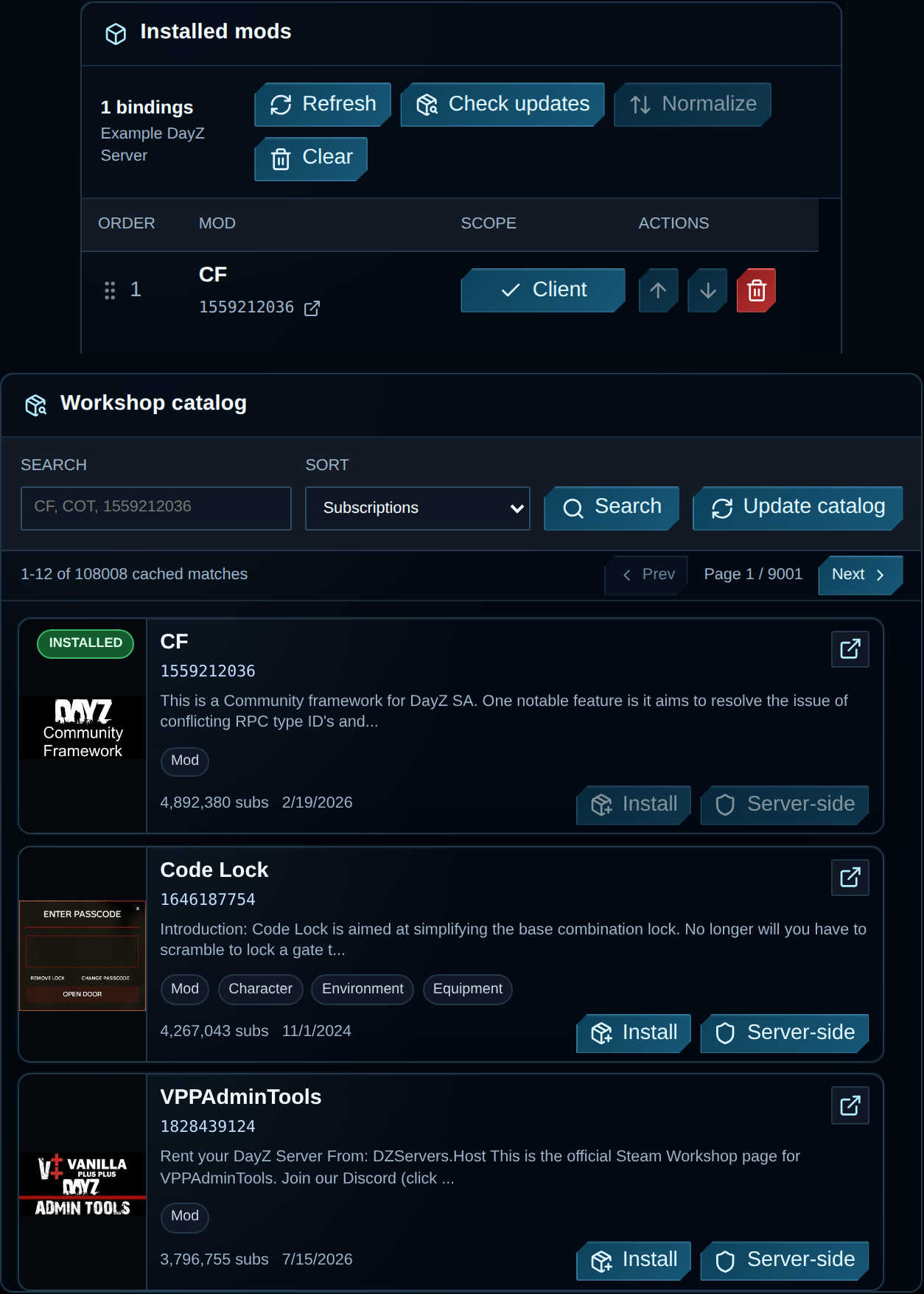
VXPanel Mods page with example server data; catalog counts are from this documentation image. Source.
Select Install for normal client content; choose Server-side only when the author supports that scope. Review required mods, wait for Installed mods, then inspect load order before restarting. Our panel guide documents one active install per server. If you reopen the page during a job, it resumes showing that job’s status.
Check updates compares installed-copy timestamps with cached Steam timestamps. Update catalog refreshes information from Steam. Neither action installs files. Confirm Restore mods on startup under Advanced settings or ask support which update workflow applies before relying on a restart.
Recheck status after updating and refreshing the catalog. If joins fail, compare client/server versions, keys and scope with the author’s instructions. Read removal confirmations too: removing a numeric Workshop binding deletes that Workshop folder, while removing a local binding keeps its files. Back up mod-owned data before either change. The panel mod guide explains these controls.
Test the intended mods, scripts, settings and player activity before choosing capacity. Use the DayZ cost guide to compare the plan and maintenance budget.
VxShield comes with DayZ hosting. Our StalkerZ case study documents a particular incident, not a guaranteed outcome for another attack. The DayZ DDoS docs explain protocol-specific filtering.
Common Questions
How do I add mods to my DayZ server?
Follow the author’s files, keys, dependencies and startup instructions for a manual install. In VXPanel, use the Workshop catalog, review requirements, then confirm scope and order before restarting. Use Server-side only for packages that support server-only loading.
What is the -mod= parameter in DayZ?
-mod= selects the normal mod list. Separate paths with semicolons and quote the argument, such as "-mod=@CF;@VPPAdminTools". Match the installed folder names and the author’s dependency order.
Why do I get “signature verification failed” in DayZ?
Read the rejected filename and check client/server versions, signed PBO files and accepted keys. Obtain matching, intact publisher files and retest. Keep signature checks enabled and retain keys needed by other active mods.
What is the difference between -mod= and -serverMod= in DayZ?
-mod= loads normal client-visible mods; -serverMod= is for author-supported server-only packages. Admin tools can need client files. The VPP guide loads CF and VPPAdminTools through -mod=.
What are the best DayZ mods in 2026?
Choose the features your players need, then follow each author’s requirements. Expansion has AI, vehicle and base-building modules; VPPAdminTools handles administration. Expansion’s installation guide lists CF and Dabs Framework.
Can I install DayZ mods without Steam Workshop?
Yes. Obtain a server-ready release and follow its licence, folders, dependencies, keys and startup instructions. A source-code archive may need packaging. Transfer the release through SFTP or another supported method and test with the required client files.
Run Your Modded DayZ Server on VYKIX
Test the mod list on the configuration you intend to use. Confirm joins, loaded dependencies and playable busy areas before moving the community.
VYKIX modded DayZ hosting includes game-file and configuration access, Workshop installs in VXPanel and VxShield. The managed plan has no per-slot fee; slots, RAM and storage remain subject to fair use. Measure your workload and review the portal total, including applicable taxes and fees, before payment.
Use the DayZ setup guide for first launch. For cooperative play, compare DayZ PvE hosting and use the PvE setup guide to test damage rules and zones.
Moving an existing server? Eligible switchers can receive best-effort migration and seven days added to the paid plan after we confirm scope and terms.
Game-aware DDoS protection for your server.
Run your game server with VxShield included. Ask about free migration and seven days free for eligible customers switching hosts. VYKIX confirms the scope, timing, and terms before the move.
Continue with