Best Hytale Server Hosting: 5 Tests a Host Must Pass
Test Hytale hosting before moving your world: mod uploads, backup recovery, server login, workload fit and DDoS protection.
On this page
Before moving a Hytale world, make the host show you how to get it back. Then check mod uploads, server login and a normal playing session. Those tests tell you more than a hardware badge beside a Buy button.
VYKIX’s managed Hytale plan gives you game-file access while we maintain the host operating system. Use a demonstration or trial where the provider offers one, and check the current order before paying.
Test 1: Upload the files your server needs
Bring a mod you intend to use and a copy of your world. Check that you can upload both, edit their configuration and download them again. Ask about SFTP before attempting a large world upload through a browser.
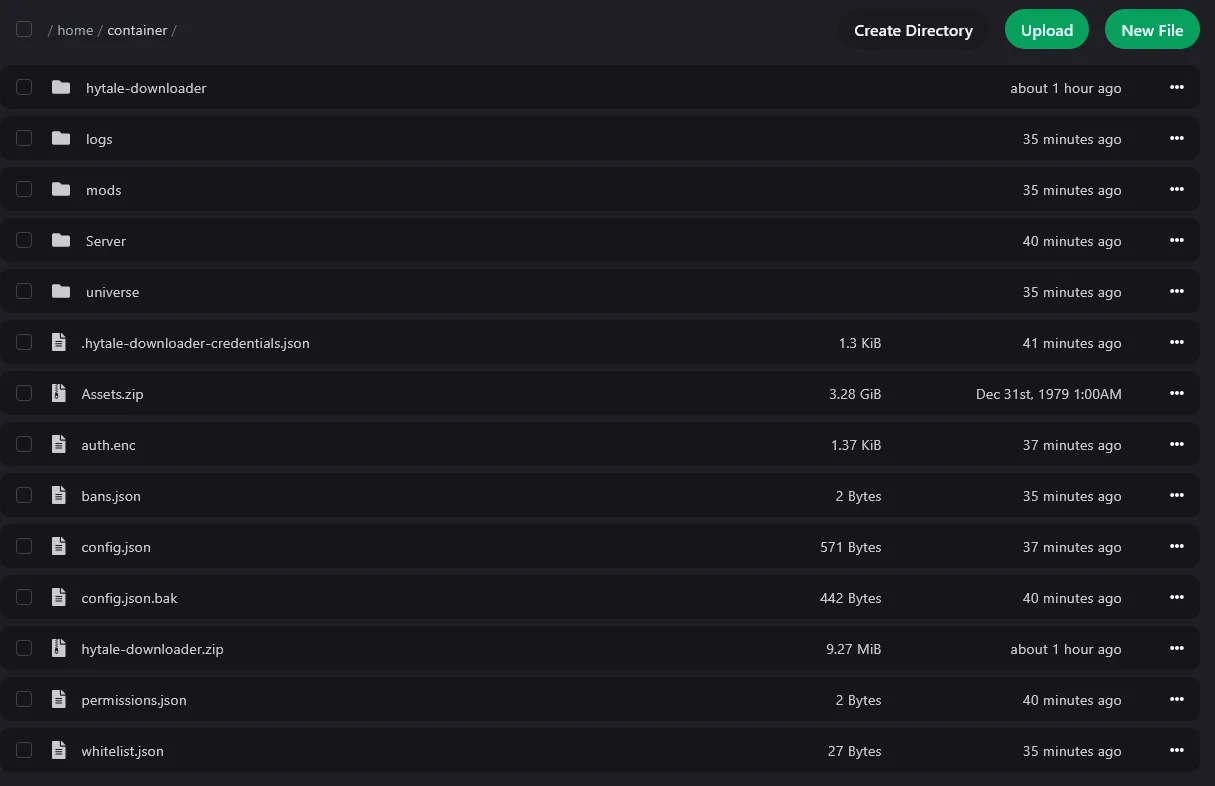
Our Hytale setup guide includes the VXPanel file-manager capture above. It shows mods, universe and Server folders, plus configuration files. The guide also documents web uploads and SFTP. That is evidence of the file workflow; it says nothing about how many players that world can support.
Hytale packages go in mods/. Match the package to your game build and install its dependencies, then read the startup log and try its feature in game. A host’s “mod support” label cannot do that compatibility check for you. Hytale Server Manual
Test 2: Recover a world before relying on backups
Find out where backups live and how to export them. Create a named copy, wait for completion and download it outside the server. Use a separate instance for a restore rehearsal where possible: restoring over the live world discards progress made since that snapshot.
The listed VYKIX paid Hytale plan has three same-server backup slots. They help with recovery from a bad edit, but share the physical server with your active files. Keep an external copy for a server or storage failure.
Ask who applies game updates and who checks the mods afterward. Host-OS maintenance does not answer either question.
Test 3: Check server login and credential storage
Read the console before requesting another code. Our documented downloader setup has a file-download login followed by game-server authentication. Other installations can arrive authenticated: the publisher’s bootstrap route carries its credentials into the installed server.
For the running server, start with /auth status. If it needs login, use /auth login device, approve the active request with your Hytale account and follow the expiry shown in the console.
Inspect the store with /auth persistence. The publisher documents Memory and Encrypted; Memory loses credentials when the process stops. Encrypted storage can retain them across restarts, but revocation and authentication-service failures still need attention. Publisher authentication guide
Check that the command succeeds and keep the error if it does not. Our VYKIX authentication steps show the panel sequence. Remove device codes, tokens and code-bearing URLs before sharing screenshots.
Test 4: Test your workload on named hardware
Ask which CPU, allocation, limits and location your order receives. The listed VYKIX paid Hytale package names an overclocked i9-14900K build, DDR5 memory and NVMe storage, subject to fair use.
Load your intended world, view distance and mods. Invite the group to do what they came to do: explore, build and use those mods. Record CPU use, process memory and stalls during that session.
An empty-world login leaves the busy-session question unanswered. A clock figure from another customer’s DayZ server does too. Keep the tested workload beside the result instead of turning it into an unsupported player limit.
Test 5: Confirm protection scope and responsibility
The paid Hytale plan includes VxShield DDoS protection. Its published 17 Tbps figure describes aggregate protection-network capacity, not a Hytale benchmark or a guarantee for an individual attack.
Ask who maintains the rules for your assigned endpoint and what support needs when joins fail. Hytale uses QUIC over UDP. The game port, OS firewall and upstream protection must match.
Our VxShield guide separates staff-managed game hosting from customer-managed VPS and bare-metal rules. Establish which side owns the change before opening ports.
Review the order and migration scope
VYKIX’s advertised free 48-hour trials cover DayZ and Rust, not Hytale. A trial on another game’s hardware cannot settle Hytale workload fit.
For a move, agree on eligibility and technical scope before choosing the date. The switcher offer provides best-effort migration and seven days added to an eligible paid plan under its terms. Confirm the files, databases and integrations included, and keep your own backups.
Compare Hytale plans, checking the billing term, taxes and fees in the order. Keep the server setup guide open for first start.
Game-aware DDoS protection for your server.
Run your game server with VxShield included. Ask about free migration and seven days free for eligible customers switching hosts. VYKIX confirms the scope, timing, and terms before the move.
Continue with